Tuesday, January 1, 2013

Windows phone 7.8 Available through Nokia Care

Hello All, Windows phone 7.8 upgrade is finally there via  30 minute upgrade from Nokia Care. So I got my Lumia 510 from them.. and here are the new features added to it...


The tiles now occupy more space allowing more icons, as well as repositioning them to another place and size.
 .

 The Windows phone 7.8 now has full Bluetooth capabilities, which will now allow you to share and receive files such as Pictures and Music.

 It also includes an Ringtone maker, which allows you to pick up a song from your music library and create a max length of 30 sec ringtone.

The Windows phone 7.8 also allows you to set more colored themes to your phone. The list is gone, now its a grid of color squares as option.

The performance of the phone is rather same as well as the battery life. The look and feel is inspired by windows phone 8.


The upgrade is available to all existing Nokia Lumia Phones.
Read more...

Saturday, October 20, 2012

How to install Vodafone K3770-Z USB 3G Modem on Windows 8

AIM of Tutorial: - Installing Vodafone K3770-Z on Windows 8 32-bit/64-bit.


Installing, Vodafone K3770-Z USB 3G Mobile Broadband on Windows 8 is same as installing it in Windows 7.

The difference is that, the new Windows 8 OS doesn't come with intended software framework to Run/Install Vodafone broadband Lite software.

So basically you need to just plug-in the Vodafone K3770-Z dongle and let the windows update for framework update to come up.

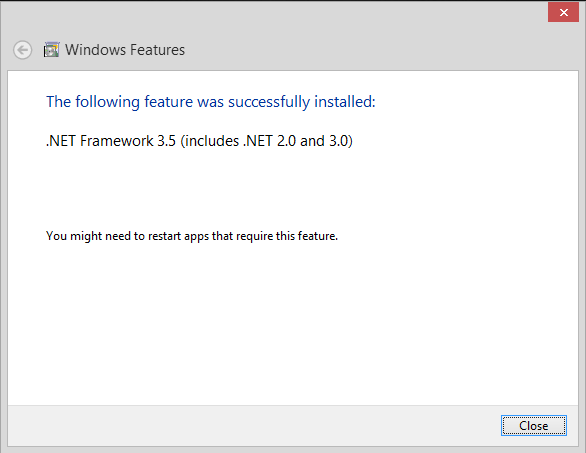
 Here is how it looks:-


After searching for required files, It will start downloading this framework.


and ultimately completes its installation, after which your Vodafone Mobile BroadBand Lite Software will start to install automatically.

Note that in case you do not get this update, you can install it manually from this link: .Net Framework 3.5 Service Pack 1 

Enjoy !!
Read more...

Ebay India starts Pre-Orders for shipping Microsoft Surface Windows 8 RT Tablets.

Ebay India starts Pre-Orders for shipping Microsoft Surface Windows 8 RT Tablets, starting from Rs. 38,490 for 32GB.


Resellers at eBay India has started taking Pre-Orders for the Microsoft's latest offering, The Microsoft Surface Windows 8 RT Tablet and confirms delivery by 15th Nov, if pre-ordered before 1st Nov. 
The range starts from 32GB without keyboard cover @ Rs.38,490 and Rs.49,990 with Keyboard cover with 5 color options. 
 The Following are detailed specifications of the Surface Tablet:-

Dimensions: 10.81 x 6.77 x 0.37 in Weight: Less than 1.5 lbs  Casing: VaporMg  Color: Dark Titanium  Physical buttons: Volume, Power.
OS: Windows RT, Microsoft Office Home and Student 2013 RT Preview.
DISPLAY: Screen: 10.6" ClearType HD Display, Resolution: 1366 x768, Aspect Ratio: 16:9 (widescreen), Touch: 5-point multi-touch.
CPU : NVIDIA T30, System Memory: 2 GB RAM

Storage: 32GB / 64GB

CONNECTIVITY : Wi-Fi (802.11a/b/g/n), Bluetooth 4.0 technology.

BATTERY: Up to 8 hours mixed activity, 7-15 days idle life.

CAMERA: Two 720p HD cameras, front and rear-facing.

VIDEO/AUDIO: Two microphones, Stereo speakers.

PORTS: Full-size USB 2.0, microSDXC card reader, Headphone jack, HD video out port, Cover port.

SENSORS: Ambient light sensor, Accelerometer, Gyroscope, Magnetometer.

APPS (included): Mail Messaging, Word, Power Point,  Excel, OneNote, SkyDrive,Internet Explorer 10, Bing, Music, Video, Games.
WARRANTY: 1-year limited hardware warranty.


Read more...

Saturday, October 13, 2012

Samsung Galaxy S3 mini Vs Galaxy S2

Samsung Galaxy S3 mini Vs Galaxy S2

  Which one do you think is better ?


Samsung Galaxy S3 Mini  Samsung Galaxy S2
Display :- 480 x 800 pixels, 4.0 inches (~233 ppi pixel density) 480 x 800 pixels, 4.3 inches (~217 ppi pixel density)
Memory/ RAM :- microSD, up to 32 GB
Internal  8/16 GB, 1 GB RAM
microSD, up to 32GB
Internal  16GB/32GB storage, 1 GB RAM
Bluetooth :- Bluetooth  Yes, v4.0 with A2DP, LE, EDR Yes, v3.0+HS
NFC :- YES NO
Camera :- 5 MP, 2592x1944 pixels, autofocus, LED flash Yes, Video:720p@30fps
Secondary  Yes, VGA
8 MP, 3264x2448 pixels, autofocus, LED flash Yes, Video:1080p@30fps,
Secondary  Yes, 2 MP
OS :- Android OS, v4.1 (Jelly Bean) Android OS, v4.0 (ICS)
Processor :- Nova Thor U8420 Dual-core 1 GHz Cortex-A9 Dual-core 1.2 GHz Mali-400MP GPU
Battery :- Li-ion 1500mAh Standard battery, Li-Ion 1650 mAh
Stand-by  Up to 710 h (2G) / Up to 610 h (3G)
Talk time  Up to 18 h 20 min (2G) / Up to 8 h 40 min (3G)
Body:- Dimensions  121.6 x 63 x 9.9 mm
Weight  111.5 g
Dimensions  125.3 x 66.1 x 8.5 mm
Weight  116 g


Read more...

Thursday, October 4, 2012

How to play NFS Most Wanted like LAN via internet with your friends.

Aim Of Tutorial : To Play NFS-MostWanted in LAN via Internet (online) with your Friends using Game Ranger.


NFS Most Wanted is one of the top LAN games played in the world, What if you could play on LAN via internet with your friends ?

So here is a simple tutorial  to play NFS-MW online. Assuming you have already installed the game, Follow the steps carefully:-

1.> Download GameRanger Software and start its installation, while installing it will ask you to register with them using your E-mail ID and password set by you.


2.> The installation will continue after registration and bring up 2 separate windows with one having a long list of online gaming servers of Age of Empires and NFS-Most Wanted etc and another your online friends list.

3.> Your other friends should follow the same steps till here. By default GameRanger automatically detects the games installed in your PC ( if installed in Windows Drive) otherewise you will need to browse for the speed.exe file to tell GameRanger where is Mostwanted installed on your drive.

4.> After doing above steps, any one of your friends can HOST the game by pressing HOST button on Right TOP corner of the GameRanger Window.

5.> A separate ROOM (chat window) for the hosted game is created where you can invite your friends and other online people to JOIN your server, there you can ask your friends to be ready and START the game by pressing "Start" button in right below ( other users will not get this "Start" button since you are hosting it).

6.> As soon as you press START, every friend's screen will get locked and NFS most wanted game will start automatically on everyone's screen. They just need to press the "Continue" Button and gameranger will do the rest.

7.> Game Ranger will automatically enter your and their Game-Ranger nick and create the server and even connect to it and ask for the game type you want to start like Circuit or Sprint etc. After you setup the game preferences,

8.> Your friends will automatically reach the Start Line where they can choose Bonus and Stock cars and start playing.......Enjoy :)
Read more...

Saturday, September 15, 2012

Nokia Lumia 900 Launched in India @ Rs. 32999


Yes!, Finally the awaited lumia 900 phone is now available in India via Nokia.co.in and Flipkart.com at a price tag of Rs.32,999.
Lumia 900 features a 4.3 inch Super AMOLED screen, on a 1.4Ghz Scorpion Single Core Processor with 512mb RAM, running Windows Phone 7.8. The Indian version of Lumia 900 also has support for LTE (4G) cat3 @50 Mbps.
The Phone boasts a 1830mAh battery which promises 7Hrs of Talktime and 300Hrs of Standby on both 2G and 3G.
Other features include, 16gb inbuilt storage which is not expandable, since it has no SD-card support. an 8mp Auto focus Camera with  dual LED Flash. and a secondary front facing camera of 1mp for video chat.

The Nokia Lumia 900 will not get Windows phone 8 Update as recommended by Nokia. Since Other Nokia Lumia 610, 710, 800 are also running Windows 7.5 with similar specs, I think its too late for Nokia to sell this phone in India.

At the Price of 33,000 there are much better alternatives to this phone, featuring Full HD, 3D Playback support and Dual-Core Processing and with expandable memory of about 32GB.
Read more...

Thursday, September 13, 2012

Apple Iphone 5

Here is the Debate Topic from a Tweet :


"Apple isn’t selling a tech product, it’s selling a lifestyle. Apple is the Rolls-Royce of computers – the clean, slick beautifully designed products command a premium price partly because they are a luxury brand."
Read more...

Sunday, August 12, 2012

How to create and configure CS 1.6 Server with WiFi Router

Aim of Tutorial: To Create CS 1.6 Server for Wi-Fi Router users.

Wondering.. Why hlds.exe shows 192.168.XXX.XXX:27015 as CS Ip ? not letting your friends connect your own hosted CS 1.6 server ?
Here is, a well explained way to host CS server via Wi-Fi router which will allow your friends to connect your cs server remotely.

Step 1: Find a good copy of CS1.6 Setup and Install as usual.

Step 2: Browse the C:/Program Files/CounterStrike Folder, to find a file called HLDS.exe with a Red-Icon.


Step 3: Run this file as Administrator, and "Allow" (OR "Unblock" for Windows XP) this .exe file pass through Windows Firewall Notification for both Public and Private Access (asks you only first time, tick both Private and Public). Then set UDP port as 80 instead of 27015 (default).


Step 4: Now, Open your Router configuration Page on a Web-browser. for example, 192.168.0.1 (Dlink) to Port-Forward, the Port number 80 for your System 192.168.0.100 (My system had this IP given to me by Router via DHCP). Visit here to know how to port forward ports in your router.


Step 5: Save the Port-Forward settings in your router and open, http://google.com and search "My ip" to find your External IP address.
 

Step 6: Copy-Paste that External IP-Address to a notepad and put :80 in back of it. For example, 182.239.45.23:80 and save this for your own record.

Step 7: Now, Copy paste the whole IP with port number (182.239.45.23:80) to your friends to let them connect to your own CS1.6 server. Do not worry about the local ip 192.168.xxx.xxx:80 shown in hlds.exe server window.


Step 8: The important thing to remember is to Copy paste the Local Ip for yourself (192.168.0.100:80) if you, yourself also want to connect your own server.


Please Note:- Port-forwarding Port number 80 is very in-secure, so its recommended that you set a difficult password and username to Wi-fi Router. Not doing this will allow a hacker to view and edit your Router page and settings in it.


Enjoy !

Read more...

Saturday, August 11, 2012

3G Plans of VODAFONE for PrePaid

1 - Rs 9, 25 MB buit-in data,          charges after 30 mins 2p/10Kb,   Validity: 1 Day

2 - Rs 25, 75 MB built-in data,        charges after 150MB:2p/10Kb,       Validity: 3 Days

3 - Rs 43, 150 MB built-in data,       charges after 150MB:2p/10Kb,       Validity: 7 Days

3 - Rs 102, 300 MB built-in data,     charges after 300MB:2p/10Kb,       Validity: 30 Days

4 - Rs 199, 500MB built-in data,       charges after 500MB:2p/10Kb,       Validity: 30 Days

5 - Rs 249, 1 GB built-in data,         charges after 1GB:2p/10Kb,         Validity: 30 Days

6 - Rs 375, 1.5 GB built-in data,      charges after 1.5GB:2p/10Kb,       Validity: 30 Days

7 - Rs 449, 2GB built-in data,          charges after 2GB:2p/10Kb,         Validity: 30 Days

8 - Rs 850, 5 GB built-in data,         charges after 5GB:2p/10Kb,         Validity: 60 Days

9- Rs 951, 6GB built-in data,           charges after 6GB:2p/10Kb,         Validity: 30 Days

10- Rs 1500, 10GB built-in data,      charges after 10GB:2p/10Kb,        Validity: 30 Days
Read more...

Related Posts Plugin for WordPress, Blogger...